
Download Releasesnotes – AI‑Powered Release Notes Generator for Dev Teams
Overview
Releasesnotes is a modern, AI‑driven web application built specifically to automate the creation of release notes from commit messages. In fast‑moving development environments, the gap between writing code and documenting what has changed can become a bottleneck, often leading to incomplete or inconsistent release notes. Releasesnotes bridges that gap by pulling raw commit data directly from GitHub, applying natural‑language processing to understand the context of each change, and then assembling a clear, concise, and well‑structured document that can be shared with stakeholders, QA teams, and end‑users.
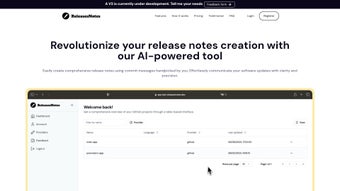
The platform’s primary goal is to let developers stay focused on building features while the tool handles the repetitive, time‑consuming task of documentation. By supporting selective filtering, developers can choose which commits to include, merge messages from multiple contributors, and add custom headings to suit their workflow. The UI is intentionally minimalistic: a clean dashboard, a repository selector, and a preview pane that updates in real time as filters are applied.
Beyond the core generation engine, Releasesnotes offers version‑controlled history of previously generated notes, enabling teams to track documentation evolution alongside code. Pricing plans are tiered to accommodate solo developers, small startups, and enterprise‑level organizations, ensuring that the solution remains affordable without sacrificing performance. Whether you are releasing a minor patch or a major version upgrade, Releasesnotes guarantees that every important change is captured, formatted, and ready for distribution within minutes rather than hours.
Key Features
- GitHub Integration: Directly connect to any public or private repository, eliminating the need for manual export of commit logs.
- AI‑Powered Summarization: Natural language processing transforms raw commit messages into human‑readable bullet points and sections.
- Selective Filtering: Choose commits by date range, author, label, or keyword to keep release notes focused and relevant.
- Multi‑Contributor Consolidation: Merge messages from many contributors into a single, coherent document without duplication.
- Custom Templates: Apply pre‑built or user‑defined templates to match your organization’s branding and formatting standards.
- Real‑Time Preview: See the generated notes update instantly as you adjust filters, ensuring accuracy before export.
- Export Options: Download release notes as Markdown, HTML, or plain text, or push them directly to GitHub releases.
- Version History: Keep a searchable archive of past release notes for audit trails and compliance.
- Scalable Pricing: Free tier for individuals, tiered plans for teams, and an enterprise package with SSO and on‑premise options.
- Secure Data Handling: All connections use HTTPS, and OAuth tokens are stored encrypted, complying with GDPR and SOC 2 standards.
Installation & Usage Guide
Getting started with Releasesnotes is intentionally straightforward. Because the tool is hosted as a SaaS web application, there is no local installation required; you simply need a modern browser and a GitHub account with appropriate repository permissions. Follow these steps to begin generating release notes in under five minutes:
- Create an Account: Visit releasesnotes.io and sign up using your GitHub credentials. The OAuth flow grants the app read‑only access to the repositories you select.
- Select a Repository: After logging in, you will see a dashboard listing all accessible repositories. Click the desired repo, then choose the branch or tag you wish to document.
- Define Filters: Use the side panel to set parameters—date range, specific authors, labels (e.g., “bugfix”, “feature”), or keyword matches. The AI engine will only process commits that meet these criteria.
- Choose a Template: Pick from the default “Standard Release” template or upload your own Markdown template. Templates control heading hierarchy, styling, and optional sections such as “Known Issues”.
- Preview & Edit: The preview pane displays the generated notes in real time. You can manually tweak any line, add additional context, or reorder sections before finalizing.
- Export or Publish: Click “Export” to download the file in your preferred format, or select “Create GitHub Release” to automatically attach the notes to a new release tag.
For teams that prefer on‑premise deployment, Releasesnotes offers a Docker image that can be run behind a corporate firewall. The image includes a pre‑configured Nginx reverse proxy and can be connected to an internal GitHub Enterprise instance. Detailed Docker commands and environment variable explanations are provided in the official documentation. Regardless of deployment choice, the workflow remains consistent: connect, filter, generate, and publish.
Compatibility & System Requirements
Because Releasesnotes runs as a cloud‑based service, it is compatible with any operating system that supports a modern web browser. The application has been tested on the latest versions of Chrome, Firefox, Safari, and Edge, and it works equally well on Windows 10/11, macOS Monterey and later, and popular Linux distributions such as Ubuntu and Fedora. Mobile access is also supported through responsive design, allowing developers to generate or review notes on iOS or Android tablets using Chrome or Safari.
For on‑premise installations, the Docker container requires a host with at least 2 GB RAM, 1 CPU core, and Docker Engine version 20.10 or newer. The container runs on any OS that Docker supports, including Windows Server, macOS, and Linux. Network requirements are minimal: a stable HTTPS connection to GitHub (port 443) and outbound internet access for AI model updates.
No additional client‑side software, plugins, or runtime environments are necessary, making Releasesnotes a truly “download‑free” solution that reduces IT overhead.
Pros & Cons
Advantages
- Significant time savings – generates release notes in seconds instead of manual hours.
- AI‑driven summarization produces clear, readable language even from cryptic commit messages.
- Deep GitHub integration removes the need for CSV exports or third‑party scripts.
- Highly customizable filters and templates adapt to any team’s workflow.
- Secure OAuth authentication and encrypted token storage protect repository access.
- Free tier available for individual developers, with scalable pricing for growing teams.
Limitations
- Relies on the quality of original commit messages – poorly written commits can lead to vague notes.
- Advanced AI features currently only support English; multilingual projects may need manual adjustments.
- On‑premise deployment requires Docker knowledge, which might be a barrier for non‑technical admins.
- Limited integration outside of GitHub (e.g., GitLab or Bitbucket) – roadmap includes broader VCS support.
- Real‑time preview can be slower with extremely large repositories (over 10,000 commits).
Frequently Asked Questions
Can Releasesnotes work with private repositories?
Yes. During OAuth authentication you can grant the application read‑only access to private repositories you own or are a collaborator on. The token is stored encrypted and never shared with third parties.
Is there a limit to how many commits can be processed at once?
The SaaS version can handle up to 5,000 commits per generation request without performance degradation. For larger histories, you can split the range or use the on‑premise Docker image, which allows unlimited processing based on your hardware.
Can I export release notes directly to a GitHub release?
Absolutely. After generating the notes, click “Create GitHub Release” and the tool will create a new tag (or update an existing one) with the notes attached as the release description.
Do I need a paid plan to use the AI summarization?
The free tier includes AI summarization for up to 5 releases per month. For unlimited access, higher frequency, or enterprise‑grade SLA, you’ll need a paid subscription.
Is there an API for integrating Releasesnotes into CI/CD pipelines?
Yes. Releasesnotes provides a RESTful API that can be called from any CI tool (GitHub Actions, Jenkins, GitLab CI, etc.) to automatically generate and publish notes as part of the release workflow.
Conclusion & Next Steps
In today’s rapid development cycles, clear communication about what has changed is as crucial as the code itself. Releasesnotes delivers a fast, secure, and AI‑enhanced solution that removes the manual grunt work from release documentation. By pulling commit data straight from GitHub, applying intelligent summarization, and offering flexible export options, it empowers developers to keep stakeholders informed without sacrificing precious coding time. Whether you are a solo freelancer looking for a free tool or a large organization needing enterprise‑grade compliance, Releasesnotes scales to meet your needs.
Ready to experience frictionless release note creation? Sign up for a free account today and generate your first set of notes in minutes. For teams that require on‑premise control or advanced API integration, explore the Docker deployment guide and API documentation. Join the growing community of developers who have already cut their release documentation time by over 80 %—download Releasesnotes now and let the AI do the writing while you focus on building great software.
Pros: Time‑saving, accurate AI summaries, seamless GitHub integration.
Cons: Dependent on commit quality, limited multilingual support.



.png)



